
Tel: 020-8748-5927

Numbershark

Numbershark at School

What is Numbershark?

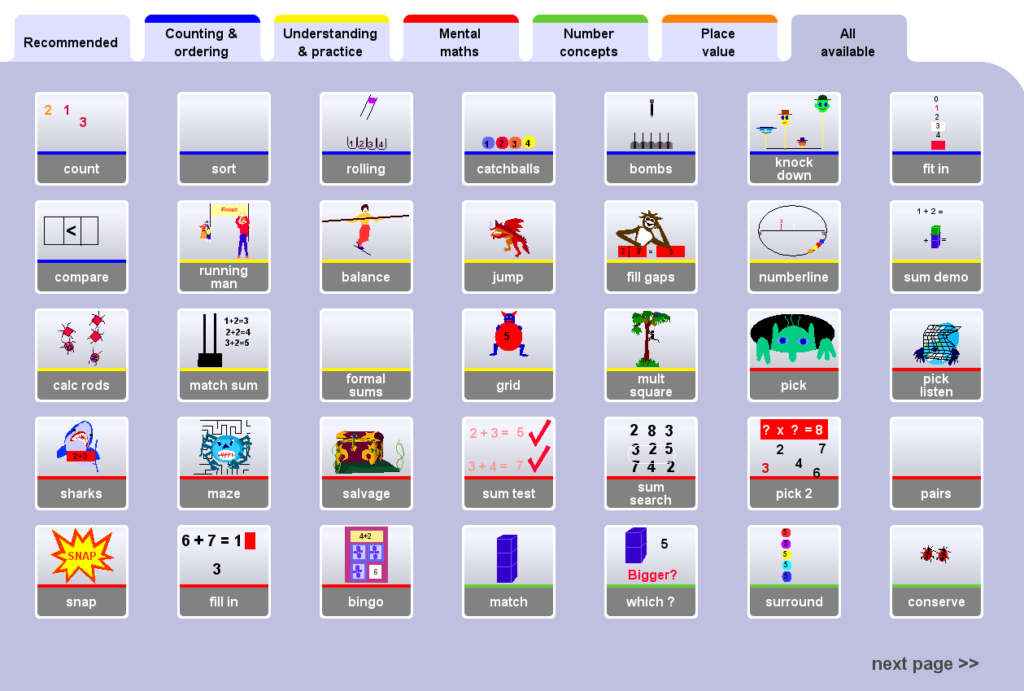
Numbershark is a computer program to help anyone improve their understanding and use of numbers. The program teaches and reinforces numeracy using 45 carefully designed games. There are over 500 topics to choose from.

  • The topics address each of the number operations
    + - x ÷ plus fractions, decimals and simple percentages, in very gradual steps.
  • The topics are quick to access and clear examples are given on screen. Numbershark gives a fresh set of ‘sums’ each time a topic is selected.
  • The wide variety of games and options give many ways to practise the same work and to promote both the understanding and the memorising of number facts, whilst maintaining interest. 
  • The games are excellent for use on an interactive whiteboard and children enjoy playing the games on the big screen. An on-screen keypad is provided with the program.
  • The program has an A4 size manual with advice on use of the program. There are also on-screen help boxes for every game and pop-up teaching notes.

For what ages is it suitable?

Numbershark is mostly used by students aged between 6 and 14. Some of the games are more suitable for younger children but many games are appropriate for any age.

A few of the games are more suitable for younger children.

Older students, with reasonable number skills use Numbershark to improve their mental maths - sometimes before exams. Variable speeds and other options meet all levels of skill.

The variety of games, concepts and topics make Numbershark suitable for use in primary school and also secondary school where students have gaps in understanding.

How will it help those with poor Number skills?

The program addresses many of the difficulties which lead students to dislike maths. These include poor short term memory, limited attention span and poor sequencing skills.

To help those with dyslexia and dyscalculia many of the games give a visual idea of what is happening when you add, subtract, multiply or divide. Fractions and decimals are also shown visually. Numbers are shown as abacus, digits, objects, number pad, rods, number line and 100 square to help basic understanding.

Most games have no time limit so students have space to work out their number strategy and to build confidence. Variable speeds and other options help to match individual needs.

Are records of student activities kept?

Records are kept once students have been added to the system. Records can also be printed out.

Can specific work be set for students?

Once students are added to the system, it is possible to choose the topics and games that they should use. This can also be done for groups of students.

What printouts are available with the topics?

Worksheets can be printed out for most topics, in different formats and layouts.

What is needed to run Numbershark?

Operating systems

PCs need Windows XP, Windows 7 (or Windows 8  - but not in touch screen mode)

Apple Macs need OSX 10.4 to 10.8 


Networks

Schools should buy a licence based on the required maximum number of students who will use the program at any one time. (concurrent users)

PCs - Network server 2003, 2008R2 are supported

Macs - Network Server OSX 10.4 to 10.8 are supported 

We cannot support Hybrid networks (Mac/Windows/Linux/Other)

Single User Version 

This version can be installed on and moved between any stand alone computers with CD or DVD drives, but needs the disk in to run. It is not intended for use on networks, many of which will not accept this version.

 There are many useful features for teachers, making it simple to use. It covers all number aspects of the Numeracy Framework and should be seen as a reinforcement for pupils struggling to grasp key mathematical skills and concepts.

Evaluation by Schoolzone

Ideal for pupil premium

 The resource can be customised to meet the needs of individual children, through the tailoring of the games that are on offer to the children and additional worksheet activities can be printed off to extend the learning beyond the software package itself.

Evaluation by TEEM

For case studies that directly relate to how the Numbershark software can support children with SEN please visit Tameside Teaching & Learning.

 I have used both programs with a range of pupils (age 4-16) since the first ones came out. I am constantly delighted with the enthusiasm with which everyone approaches their time on "the games." Please never stop producing these programs!!  J.M.Sted

Besa