


One product, many ways – how different schools use Wordshark
We asked some teachers how they use Wordshark. Here are their answers…
Which students are using Wordshark?
Appleby Grammar School, Cumbria: Currently we have 12 Year 7 students who use Wordshark in accelerated reader lessons. We have 4 students in year 8, and 8 students in year 9 who use Wordshark in intervention lessons 3 times per week. Students that are participating in intervention lessons, have an additional need e.g. Dyslexia and want to work on spelling.
Leweston School, Dorset: We use it across KS3 and KS4.
John Ruskin School, Cumbria: 11-16 yrs
Gatehouse School, East London: Year 2 children start Wordshark during their summer term and carry on until the end of year 6 or when their spelling results are above SAS 100. Children with dyslexia but also other learning differences e.g. ADHD are using it.
Upton House School, Windsor: We have children from year 1 (5-6 year olds) to year 6 (10-11 year olds) using Wordshark. Most children have a dyslexic diagnosis, ADHD and some are low with their spellings and are too young to have a formal assessment.
Four Strands English Learning Center, South Korea: Most of our students are elementary school aged Korean learners – English as a foreign language. Some have special needs.
Students that are participating in intervention lessons, have an additional need e.g. Dyslexia and want to work on spelling.
How much time do your students spend on Wordshark?
They do 20 minutes Wordshark per intervention lesson with an additional 20 minutes for accelerated reader lessons; approximately 1hr a week. Some students will do Wordshark at home, but most use it in school. Year 8 and 9 spend more time as they have intervention and accelerated reader time.
The students who qualify for a Wordshark intervention receive one 50 minute dedicated lesson per week, supported by a teacher/teaching assistant. They are also encouraged to log on from home and parents are encouraged to play an active role.
They use it only at school for around 25 minutes weekly.
Most of them use it at home, some children are able to use it in school time when the teachers remember.
They spend approximately 3 hours a week with it at school in the computer room. The more motivated ones spend time on it at home as well, but not all of the children have equal access to computers at home.
They spend approximately 3 hours a week with it at school in the computer room.
Which features do you use?
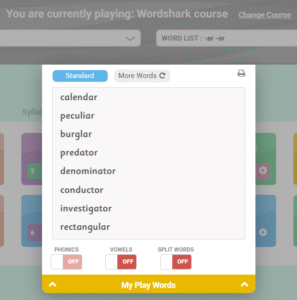
Appleby: Supershark, Set Work, Free Play
Gatehouse: Supershark
Upton: Supershark, Set Work, Free Play, Own Lists
FSELC: Supershark, Set Work, Free Play, Own Lists
How do you check progress?
We print off the Wordshark reports and monitor how many modules they work through. Spelling progress is monitored using the weekly progress reports. This shows spellings spelt correctly and amount of time student has spent on Wordshark each week. The report also shows which unit the student started Wordshark on and the unit they are working on currently e.g. we have a Year 9 student who began in year 8 on unit 8 and is now on unit 21.
I occasionally look at Wordshark reports, communicate with the children’s English teachers and look at their yearly spelling SAS results to access progress.
The children are set their class spellings/specialist teacher spellings, use Wordshark to solidify their spellings and then are tested in class or with their specialist teacher.
 We track the students on a weekly basis using the built in student progress function. We transfer the scores to excel for record keeping. Students who progress exceptionally rapidly we test separately. We find that kids who rush the program competitively or to access the games tend to take on the phonics patterns less well. In that case we reset their progress. Students are expected to reach certain stages of the word shark program before progressing to the next level of our overall program.


Using Wordshark more/more effectively
Email your questions on ‘how to’/adapting Wordshark to specific needs: online@wordshark.co.uk Book free demos with us:
- Perfect if you are new to Wordshark or would like a refresher – encourage other staff to book too!
- Prepare and ask any questions during/after; these sessions are interactive